NotebookApp for teachers

Teach every student like you had time for one.

Plan the class. Build the notebook. See the thinking. NotebookApp turns your material into individual guidance—
and brings you back at the moments only a teacher can help.

Built for Class 5 and above.

The work of teaching, connected

Plan the class. Teach it. See what landed.

NotebookApp follows the teacher’s real day—from what is on the timetable to the moment a learner needs a different explanation.

  1. 01

    Know what you teach next

    Classes, bell times, and the week ahead live in one timetable.

  2. 02

    Plan the chapter

    Turn curriculum and source material into a teachable sequence.

  3. 03

    Shape the session

    Build the hook, core teaching, AFL, closure, and resources.

  4. 04

    Give every learner a path

    Create a notebook that adapts to the experience you designed.

  5. 05

    Return where you matter

    See who is moving, who is stuck, and the thinking underneath.

Tuesday · Your teaching day

Everything starts from what is actually on the timetable.

Plan once in the Staff Room. The right session appears against the right class, with the notebook and resources ready when you need them.

Explore the Staff Room
Today 3 classes
Week 4
08:10
8B · Physics Session 2 — Refraction through lenses
Ready
10:35
7A · Mathematics Session 4 — Comparing fractions
Plan
13:20
9C · Chemistry Session 1 — Atomic structure
Queued

The two sigma promise

Individual attention changes what students can do.

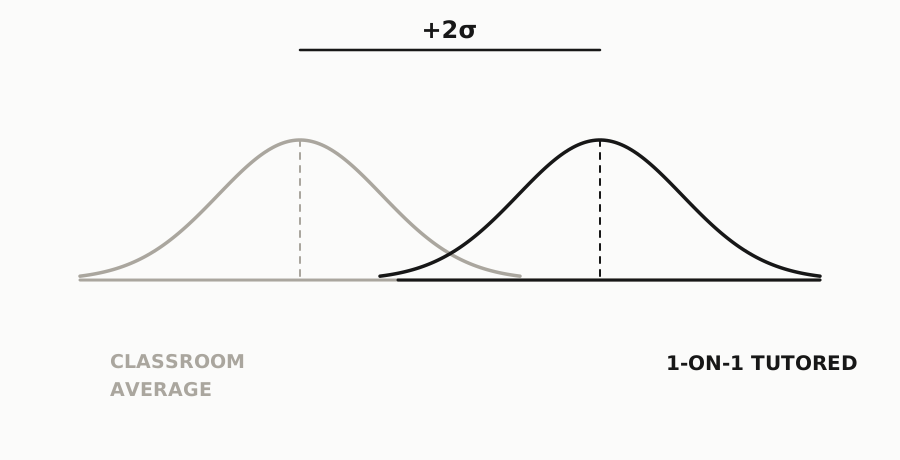
Bloom showed that one-to-one tutoring with mastery learning could move the average learner ahead of 98% of a conventional class.

The difficult part was never believing in individual attention. It was finding enough time to give it. NotebookApp helps a teacher extend that attention across the class—then makes the moments that need the teacher impossible to miss.

Mastery learning +2σ
Bell curves illustrating the two standard-deviation improvement associated with one-to-one tutoring and mastery learning
See the learning, not just the score.

Current activity, attempts, strengths, gaps, and the student’s own work stay connected.

The full teaching loop

More time for the decisions only a teacher can make.

The planning, the learning experience, and the evidence belong together. NotebookApp keeps them connected from one class to the next.

01 · Staff Room

Plan the actual work of teaching.

Start with the class you teach, when you teach it, and the chapter ahead. NotebookApp turns the source and curriculum into sessions you can shape—not a document that disappears into a folder.

  • Classes, bell schedules, and teaching queues
  • Curriculum-grounded chapter plans
  • Editable session plans with print-ready output
  • AI planning partner and math visualizations
Staff Room Class 8B · Physics
Session 2 · 45 min

Refraction through lenses

01
Hook

Why does the pencil look broken in a glass of water?

5 min
02
Core learning

Trace light across air, glass, and water.

22 min
03
Assessment for learning

Predict first. Explain the bend. Test the idea.

12 min
Lens ray visualization Lab setup
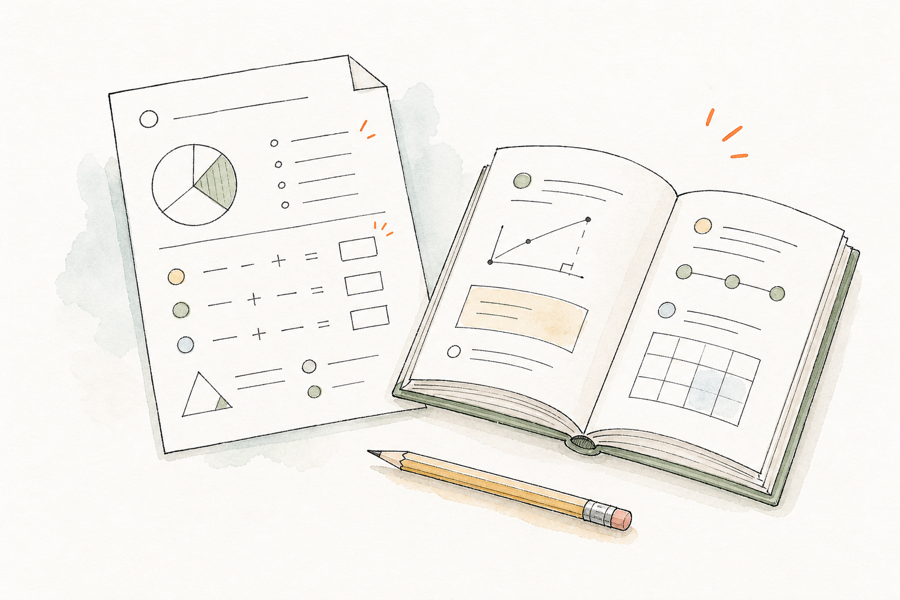
Workbook and source paper in a soft watercolor style
Create notebook Step 3 of 3
Waves — Chapter 6.pdf 8 topics · 24 questions ready
Learning setup
Evidence lab Debate Roleplay Mastery
Experience flow
01Make a prediction
02Test it against evidence
03Explain what changed
02 · Adaptive notebooks

Build from your material. Keep your intent.

A notebook can be a mastery workout, a historical interview, a chemistry roleplay, a debate, or an investigation. Max helps draft the experience; the teacher reviews what will actually happen.

  • PDFs, past papers, worksheets, and chapter sources
  • Choose topics, concepts, and the exact questions to use
  • Debates, interviews, investigations, practice, and more
  • Teacher-reviewed flow, outcomes, and learning evidence
03 · Notebook Insights

See the learning behind every answer.

Scores tell you where a learner landed. Notebook Insights shows the path: what they tried, where the idea broke, what Max changed, and when a human check-in would matter most.

  • Live activity and progress for every learner
  • Attempt-by-attempt evidence, not just final answers
  • Strengths, learning gaps, and teacher focus
  • Open the student chat or inspect their uploaded work
Notebook Insights Fractions · Class 7A
24 live
Needs attention3 Average progress68% Completed8
AM Aarav MehtaComparing unlike denominators Stuck
ZK Zoya KhanExplaining a strategy Practicing
RV Rohan VermaTransfer question Mastered
Teacher focus Check in with Aarav

He repeats the same denominator error after two different examples.

View insightsView chat
Watercolor notebook showing a teacher view of learner progress

The details matter

Powerful in the moments between the big moments.

Invite in seconds

Share a link and join code. Learners can begin without setting up another account.

See handwritten work

Students can photograph their working—even from an iPhone—and Max can respond to the reasoning on the page.

Make the invisible visible

Generate reviewable math visualizations and place the final render exactly where it belongs in a session plan.

Ready beyond the screen

Print session plans and carry the same lesson structure into the room, with links and resources attached.

Adapt without drifting

Max can retry, reframe, roleplay, debate, or transfer—while staying inside the experience the teacher approved.

Live by default

Insights update while students work, so the teacher sees a change in understanding while it can still shape the lesson.

A teacher reviewing student learning in class while a learner continues guided practice at home

For the whole learning loop

Give every student more of your attention.

Start with one class, one chapter, and the material you already teach.

Start teaching free Sign in
Built for Class 5 and above.